
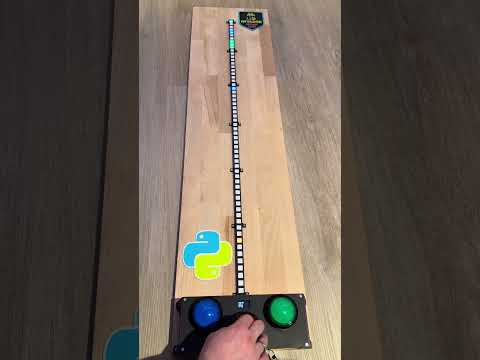
While scrolling through Instagram Reels, I came across the RGB Guardian. I found the idea so brilliant that I had to recreate it in my own way…
Materials used:
- Wooden board 120×30 cm
- 60 pcs WS2812 RGB LEDs 60/m
- RP2040 Zero
- SSD1306 display
- PAM8302 + mini speaker
- 3 arcade buttons, 60 mm dome-shaped
- 3D printed parts (Makerworld)
Wiring diagram:

Code: via CircuitePython Version 10.0.3
This project runs on any RP2040 Zero compatible board (e.g., Waveshare RP2040-Zero, Maker Pi RP2040, Xiao RP2040, etc.) using CircuitPython. This guide shows how to install CircuitPython and deploy code.py from this repository.
- RP2040 Zero board
- USB cable
- Files from this repository (especially
code.py) - Hardware:
- SSD1306 128×64 OLED (I2C)
- PAM8302 amplifier + speaker
- WS2812 / WS2812E LED strip (60 LEDs)
- 3 arcade-style buttons (red/green/blue)
-
Enter BOOT mode
Hold the BOOT button on the RP2040 Zero while plugging it into USB.
→ A USB drive named RPI-RP2 appears. -
Download CircuitPython UF2
Visit: https://circuitpython.org/downloads- Choose RP2040 or the exact RP2040 Zero variant
- Download the latest
.uf2
-
Flash CircuitPython
Drag the.uf2file onto the RPI-RP2 drive.
→ The board reboots and a CIRCUITPY drive appears.
CircuitPython is now installed!
Your CIRCUITPY drive must contain:
CIRCUITPY/
 ├─ code.py
 ├─ lib/
Copy these from the CircuitPython library bundle into lib/:
adafruit_display_text/
adafruit_displayio_ssd1306.mpy
i2cdisplaybus/
Libraries already included with CircuitPython (no need to copy):
- neopixel_write
- audiopwmio
- synthio
- digitalio
- busio
- displayio
- Go to https://circuitpython.org/libraries
- Download and unzip the latest bundle
- Copy the required libraries to the RP2040's
lib/folder
Final layout should look like:
CIRCUITPY/
 ├── code.py
 ├── lib/
 │    ├── adafruit_display_text/
 │    ├── adafruit_displayio_ssd1306.mpy
 │    ├── i2cdisplaybus/
Copy code.py from this repository directly to the CIRCUITPY drive.
The board automatically restarts every time code.py changes.
After reboot:
- OLED shows: "Press any button to start"
- LED strip initializes
- Sound system activates
- First button press starts the game
| Issue | Solution |
|---|---|
| CIRCUITPY becomes read-only | Try a different USB cable or port |
| OLED stays black | Check I2C pins (most RP2040 Zero boards: GP4 SDA, GP5 SCL) |
| No LED output | Confirm WS2812 data is on GP0 |
| No sound | Verify PAM8302 wiring to GP15 |
| Highscore not saved | Ensure CIRCUITPY isn't write-protected |